
Board Meeting Minutes Made Simple
Stop wrestling with Word documents and email attachments. Our Cat Herder's board meeting minutes software lets you type minutes live during meetings, track time against your agenda, and get formal chair sign-off. Everything lives in one place.
Take Board Meeting Minutes in Real Time
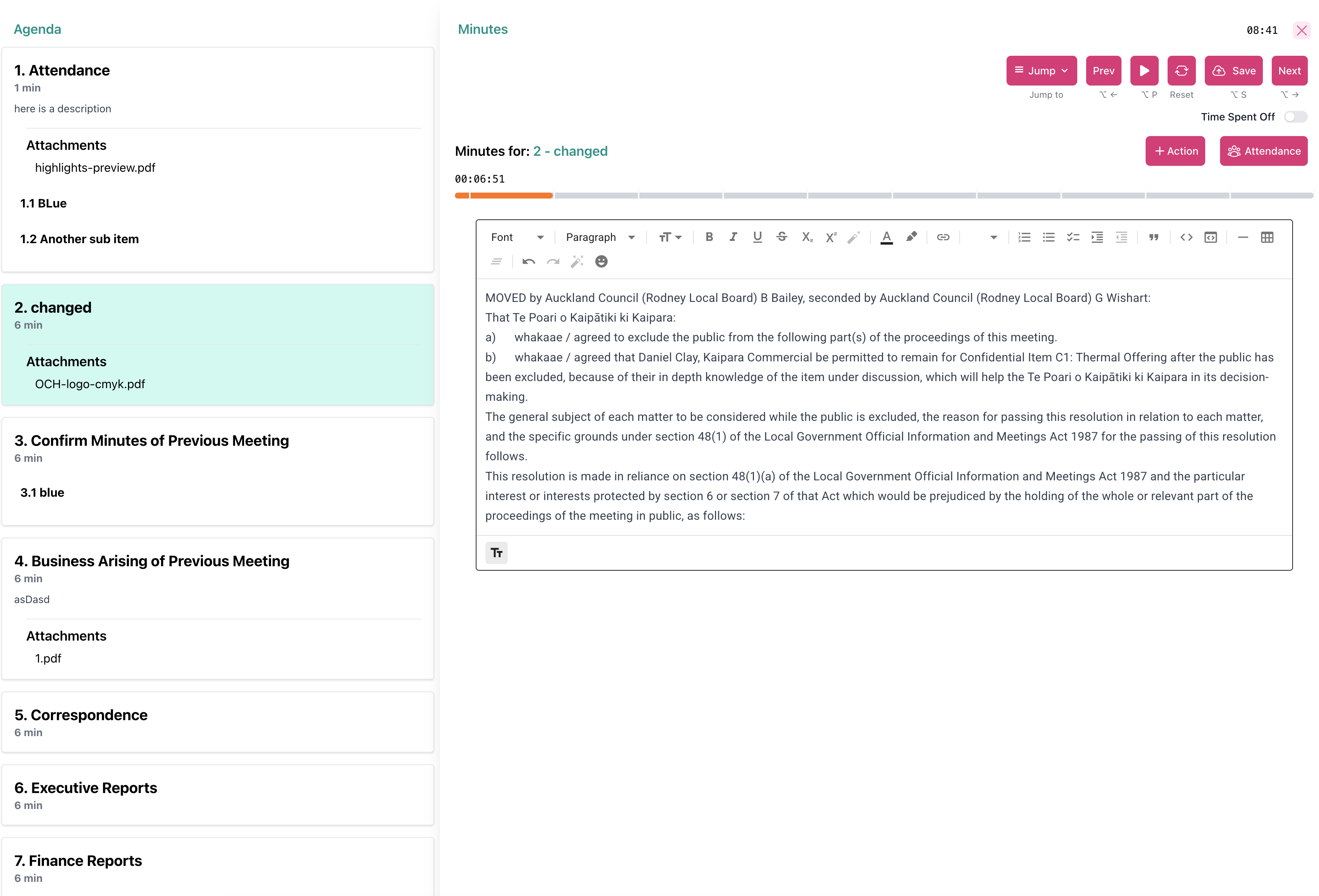
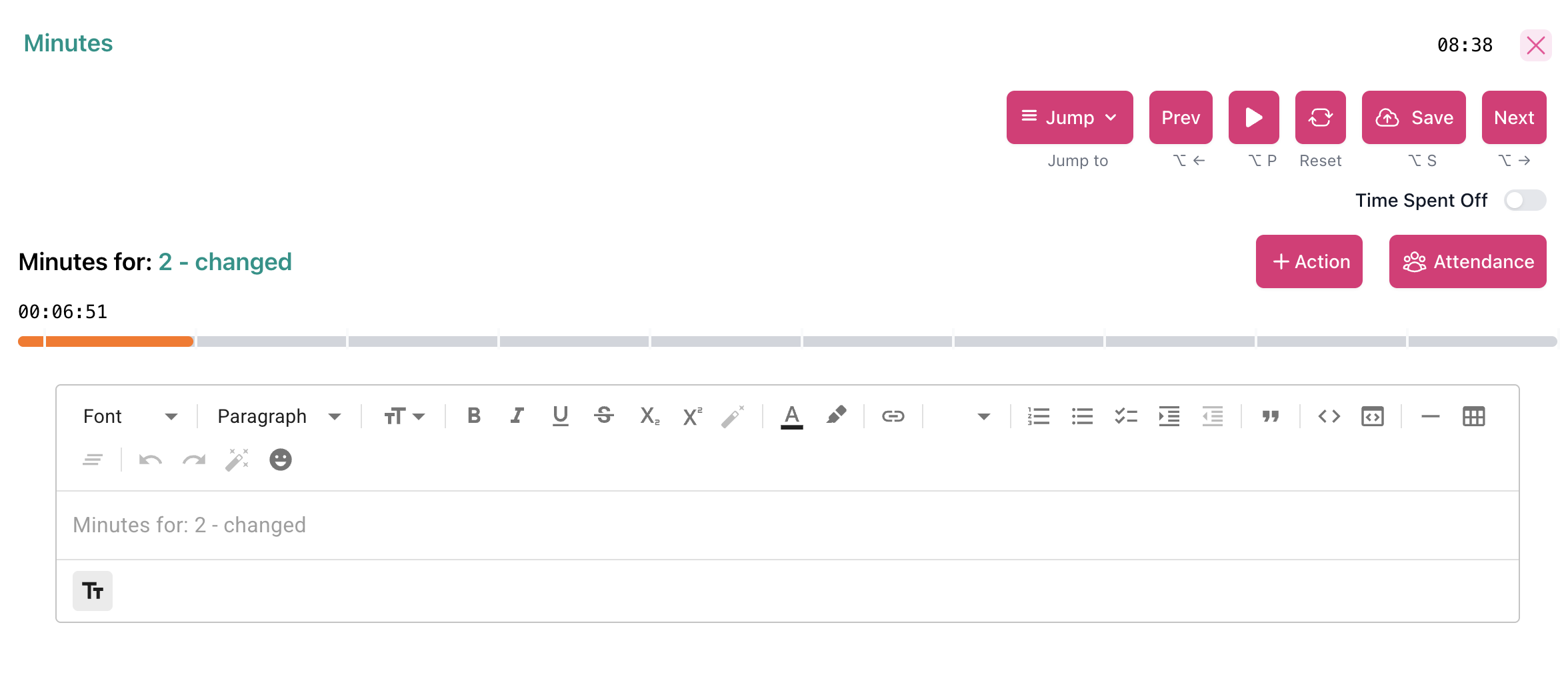
Our Cat Herder has an interface built specifically for recording board meeting minutes in real time. No more switching between apps or losing your place.
Live Minute-Taking with a Split-Screen Editor
The live minute-taking mode puts your agenda on the left and the minutes area on the right, on a single screen. No more flipping between documents. New to minute taking? Read our guide on minute-taking essentials.
-
Agenda on the left, minutes on the right
See the full agenda alongside your minutes. Jump to any agenda item during the meeting and the minute-taking area follows.
-
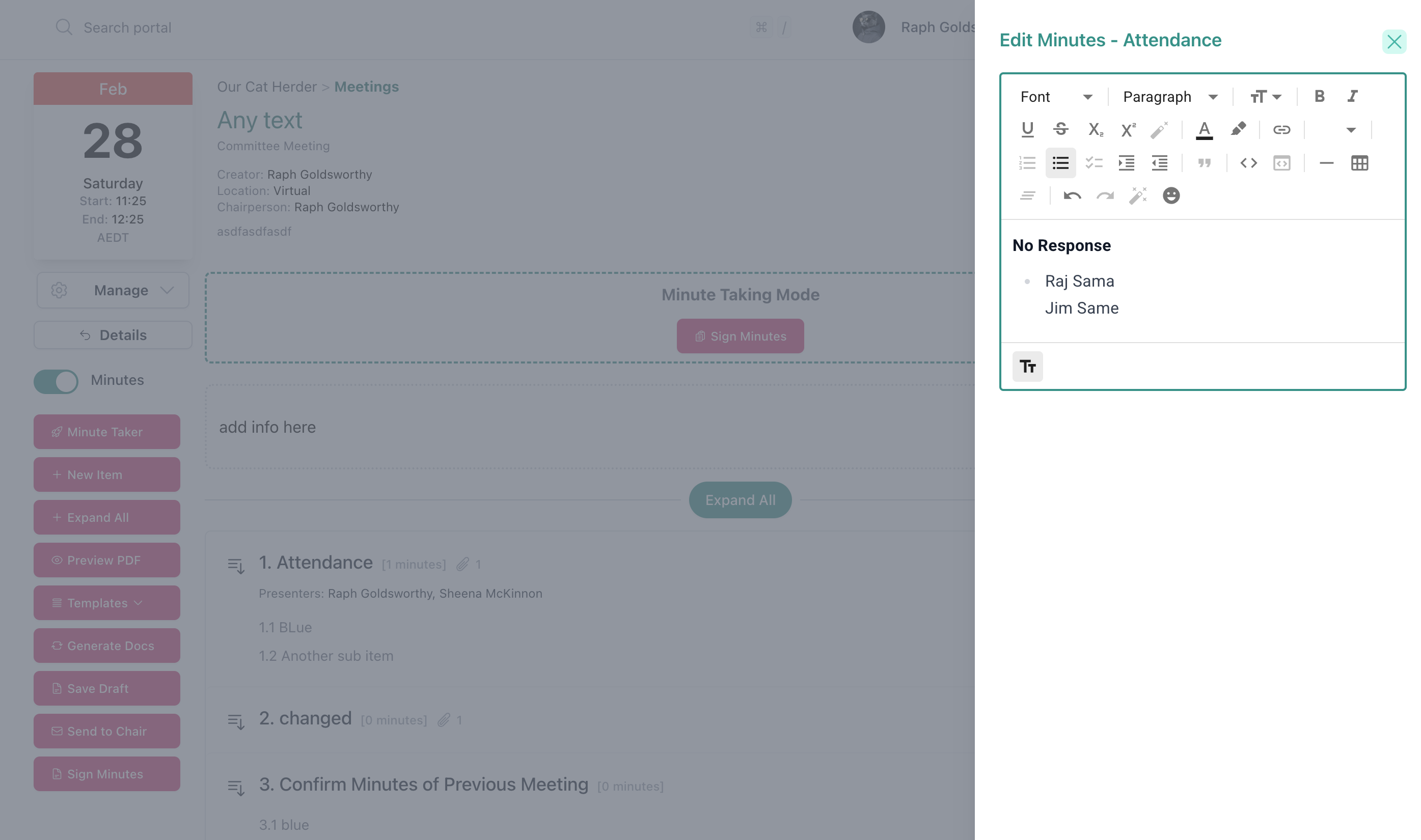
Quick attendance insertion
Record who attended, who sent apologies, and who was absent with a quick attendance tool. No need to type out names manually.
-
View documents while you write
The minute taker can view the same documents the board is looking at without leaving the minute-taking interface.
Keep Board Meetings on Track with a Colour-Coded Timer
You set a time allocation for each agenda item. The meeting timer shows whether you are on track, running close, or over time.
-
Green — On time
The timer stays green while the current agenda item is within its allocated time.
-
Orange — Approaching the limit
The allocated time for this agenda item is running out.
-
Red — Time exceeded
The item has gone over its allocated time. The timer resets when you move to the next agenda item.
Capture Action Items While Taking Minutes
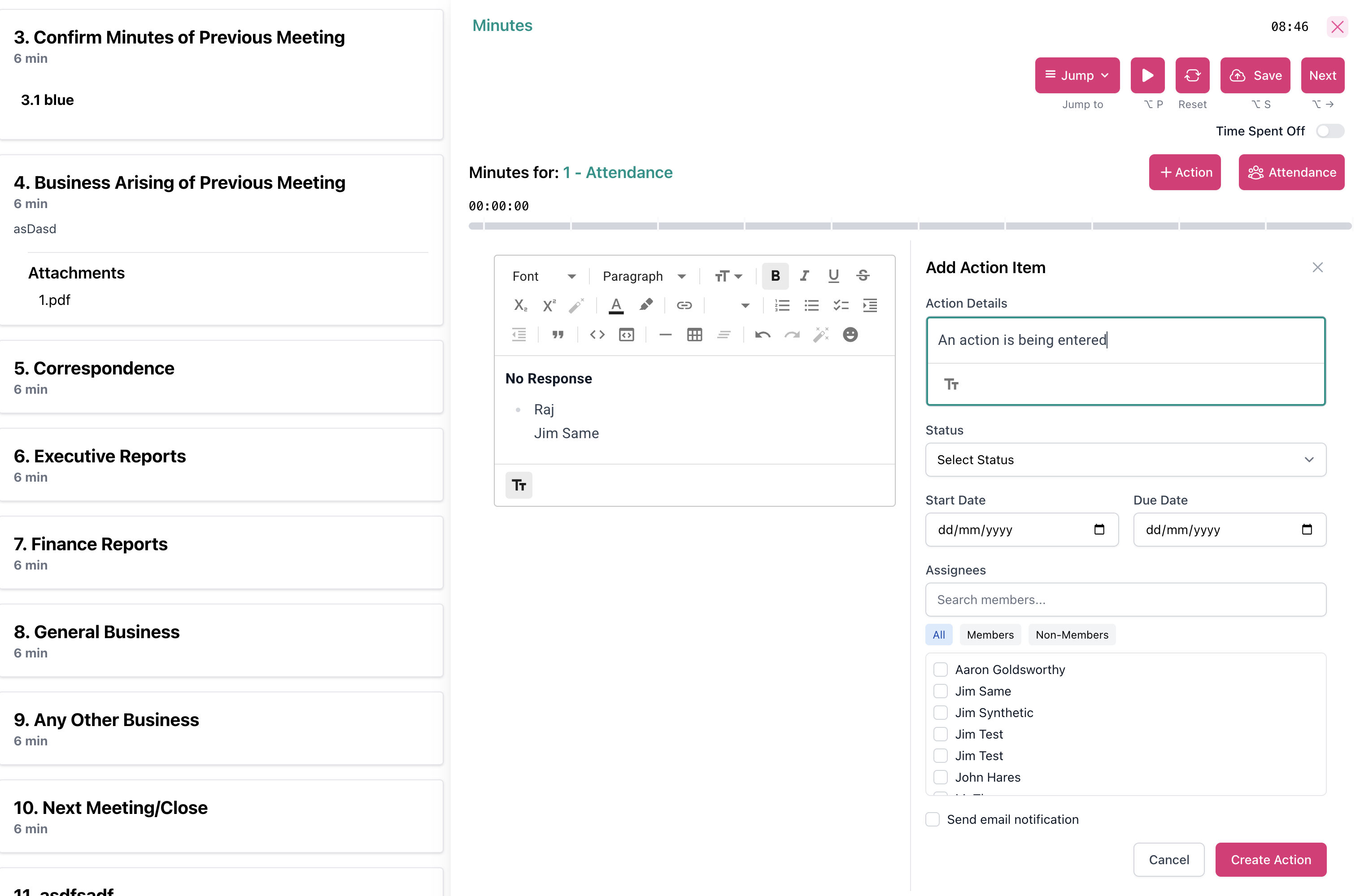
Action items assigned during a meeting shouldn't get lost. With Our Cat Herder, you create and assign actions directly from the minute-taking screen, tied to the agenda item they came from.
-
Create actions mid-meeting
Add action items while you are taking minutes. Each action is linked to the specific agenda item, so when you follow up later you know exactly what it was about.
-
Outstanding actions carry forward automatically
Open actions are automatically pulled into the next meeting of the same type. Nothing gets lost between meetings.
-
Previous minutes auto-linked
The previous meeting's minutes are automatically pulled into the next meeting of the same type, so the board can review and approve them without anyone digging through emails.
Board Minutes Approval: Formal Chair Sign-Off
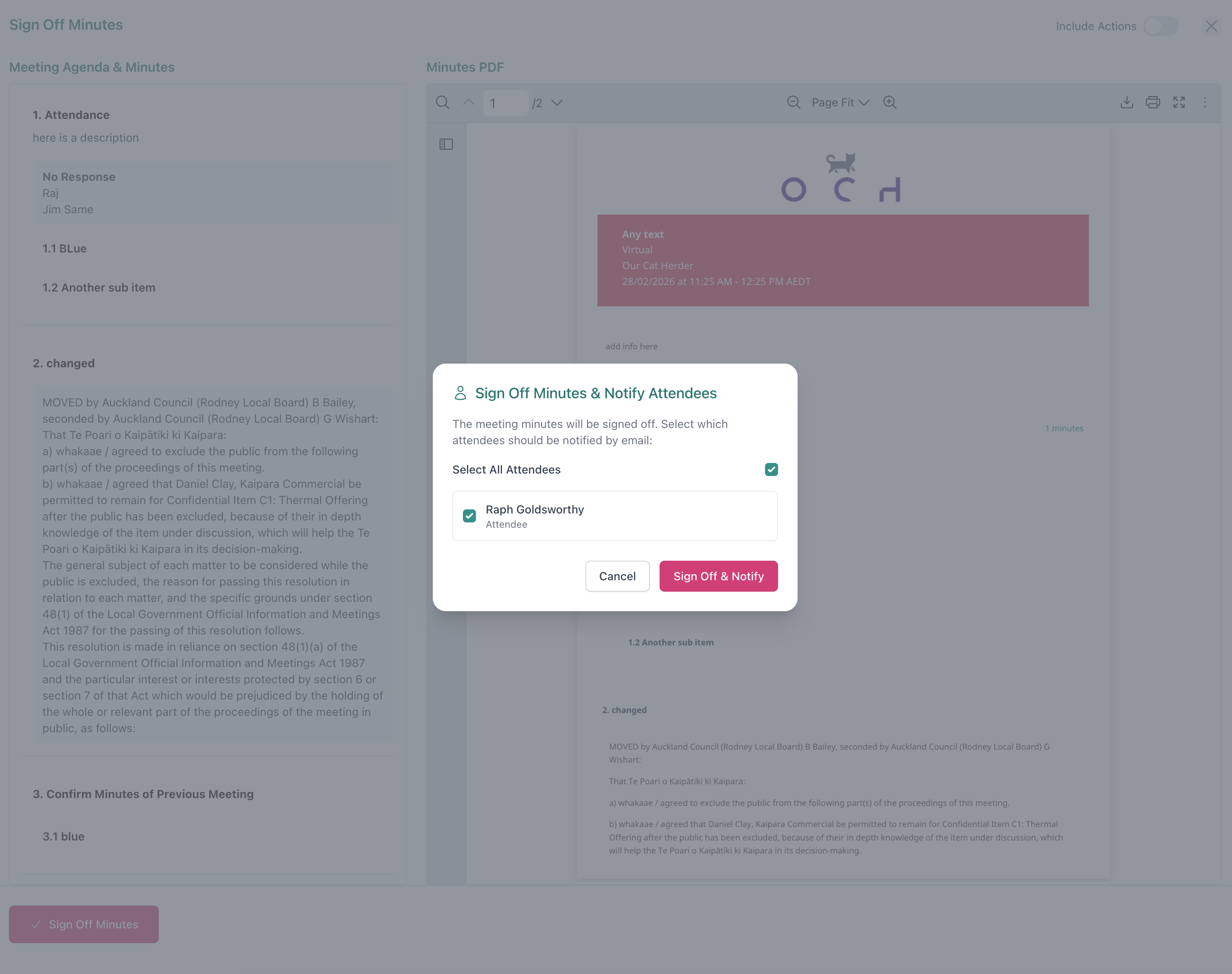
Minutes are a legal record of your board's decisions. Our Cat Herder has a structured minutes approval process: draft, review, sign off, lock. No ambiguity about whether the minutes are final.
Admin sends minutes for review
Once the minutes are drafted, the meeting administrator sends them to the chairperson for review.
Chair reviews and signs off
The chairperson receives a notification, reviews the minutes, and formally signs them off. Different committees can have different chairpersons.
Minutes are locked and distributed
Once signed off, the minutes are locked so they cannot be changed. All members can optionally be notified that the final minutes are available.
Edit Board Minutes with a Full Audit Trail
You can edit during the meeting or tidy things up afterwards. Either way, Our Cat Herder keeps a record of every change.
-
Item-level editing
Edit minutes at the individual agenda item or sub-item level. After the meeting, go straight to the section you need to fix instead of scrolling through the whole document.
-
Controlled unlock and re-lock
Need to fix something after sign-off? The admin requests an unlock from the chair. If the chair approves, you make the edit and re-lock. The audit log records what changed, before and after, for each cycle.
-
Minute taker role
Invite someone as the designated minute taker for a meeting. They can edit minutes for that meeting without needing admin access to the rest of the portal.
“OCH has provided us with better document control and greater transparency by allowing board members easy access to important documents, minutes and agendas. The agenda, minute taking and action setting function is excellent and allows for timely recording and dispatch of information.”
“As the secretary, I particularly appreciate the Minute Taker tool — it is thoughtfully designed and makes taking minutes during meetings, and refining them later, very straightforward and efficient. Our Cat Herder has proven to be a reliable and very user-friendly solution for our board — I highly recommend it.”
Everything you need
Why Boards Choose Our Cat Herder for Board Meeting Minutes
-
- No more Word documents
- Minutes live inside the portal alongside the agenda, board pack, and actions. No separate files to manage or email around.
-
- Works across committees
- Your board committee and your finance subcommittee can each have their own minute taker and chairperson. One portal handles them all with the right permissions for each.
-
- Complete audit trail
- After the chair signs the minutes, every unlock, the edits made during it, and each subsequent sign-off are recorded. Your board has a clear governance trail.
-
- Private notes for board members
- Board members can take personal notes on agenda items during the meeting. These notes are completely private and can be cleared at any time.
Australian-built for Australian boards
Board Meeting Minutes Software Built for Australian Governance
Our Cat Herder is 100% Australian owned and operated. Your board's minutes and documents are hosted on AWS in Sydney. Your data stays in Australia.
- Data hosted in Australia (AWS Sydney)
- Annual penetration testing by an independent Australian firm
- Multi-factor authentication available (and enforceable by admins)
- Your organisation owns its data. Read our security policy
Frequently Asked Questions About Board Meeting Minutes
- What is board meeting minutes software?
- Board meeting minutes software is a tool built into a board portal that lets you draft, edit, approve, and store meeting minutes digitally. Instead of writing minutes in Word and emailing them around, everything happens in one secure place alongside your agenda and board pack.
- Can I take minutes live during a board meeting?
- Yes. Our Cat Herder has a full-screen, split-screen mode designed specifically for live minute taking. Your agenda sits on the left, the minute-taking area on the right, and you can jump between agenda items, insert attendance, and create action items as the meeting progresses.
- How does the chair sign-off workflow work?
- After the meeting, the administrator sends the draft minutes to the chairperson for review. The chair gets a notification, reviews the minutes, and signs them off. Once signed off, the minutes are locked. If a correction is needed later, the admin requests an unlock from the chair, makes the edit, and re-locks. The full audit trail records each change. Learn more about approving board meeting minutes.
- Can different committees have different minute takers?
- Yes. When you invite people to a meeting, you assign them a role: attendee, minute taker, or viewer. The minute taker can edit minutes for that meeting without needing admin permissions elsewhere. Each committee can have its own minute taker and chairperson.
- Is there an audit trail for board meeting minutes?
- Yes. Every edit, sign-off, unlock, and re-lock is logged. If minutes are unlocked after sign-off, the audit log shows what changed and when.
- Where is my board's data stored?
- All data is hosted on AWS in Sydney, Australia. Your organisation owns its data, and you can export it at any time. Read more about our security practices.
Ready to simplify your minute taking? Start your free 45-day trial today.
Full access to all features. No credit card required. Set up in under 5 minutes.

We're here to help
Whether you want a walkthrough of the minute-taking features, help setting up your first meeting, or advice on your workflow, our team is ready to assist.