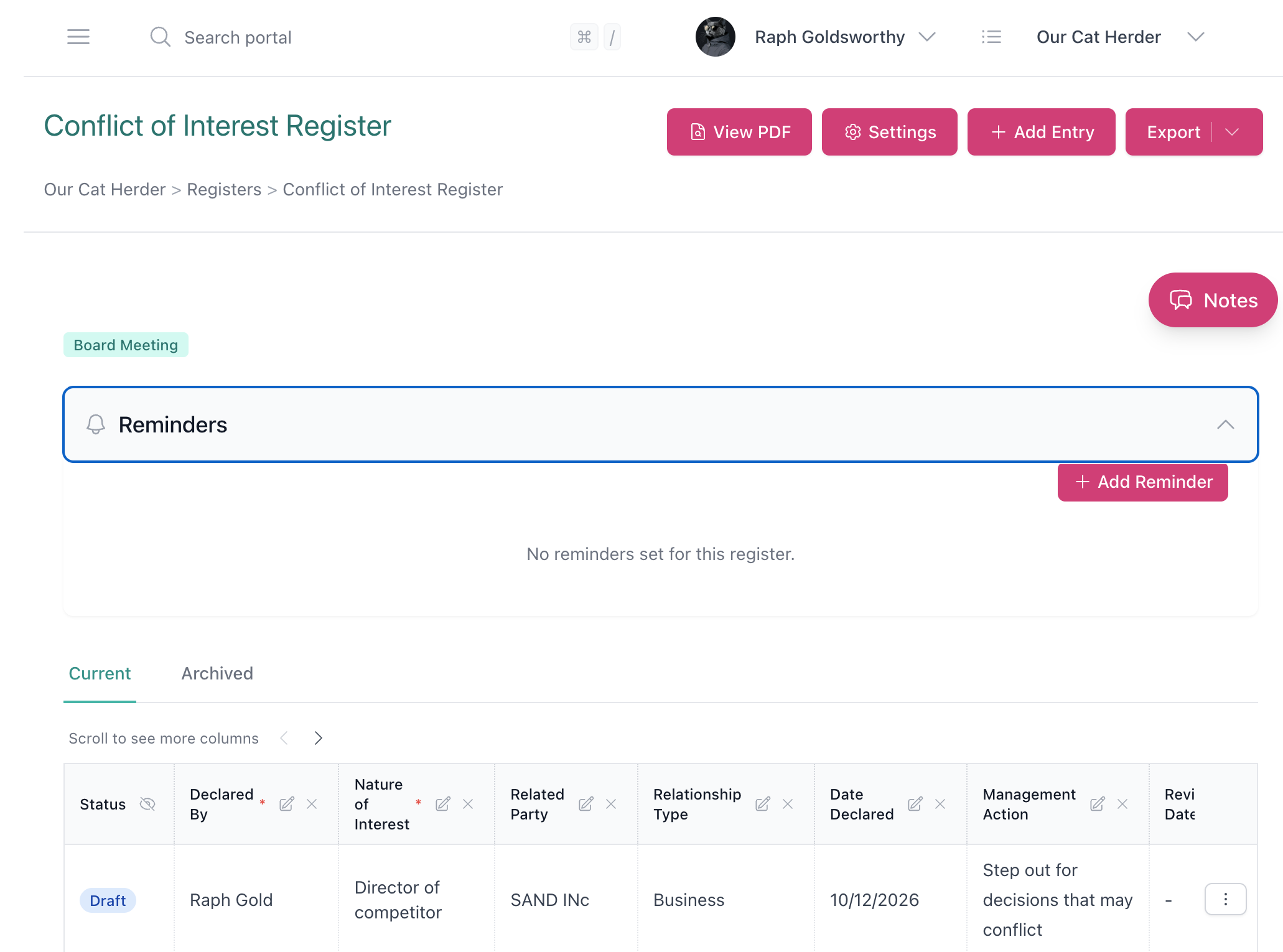
Introducing Registers: Build Any Board Register in Our Cat Herder
-
Other products by Better Boards

governance
Governance Introducing Registers: Build Any Board Register in Our Cat Herder
Every board has registers to maintain. Conflicts of interest, contracts, gifts and benefits, compliance obligations. And yet, most organisations are still managing these in spreadsheets or shared drives, disconnected from the meetings where register entries actually get created.
We have just shipped Registers in Our Cat Herder. You can now build and manage any type of register directly inside your board portal. Other board portals limit you to a single conflicts register or a fixed questionnaire format. Ours lets you create whatever you need.
What is Registers?
Registers is a customisable record-keeping feature inside your portal. Each register is a structured table: you define the columns, control who can add entries, and manage access. It sits alongside your meetings, documents, and actions, so everything is in one place.
You can start from scratch or pick from one of 9 built-in system templates:
- Assets Register
- Compliance Register
- Conflict of Interest Register
- Contracts Register
- Decisions Register
- Delegations Register
- Directors Register
- Document Control Register
- Insurance Register
Templates come with pre-configured columns. You can modify them after creation, add columns, remove columns, whatever you need. You can also save your own templates if your organisation has requirements the defaults don’t cover.
Column types
Different registers need different types of data. We support 15+ column types: Text, Rich Text, Integers, Decimals, Percentages, Dates, Checkboxes, Dropdowns, User, Multiple Users, Documents (linked to your document library), Priority, Rating, URLs, and Meeting.
Every register also has system columns for status, created date, last updated, and approval date. You can hide any of these if you don’t need them.
Forms for self-service declarations
You can turn on a form for any register. When enabled, a form is generated from your register’s columns and can be shared with board members via a secure link.
This is where it gets really useful for conflicts of interest. Instead of waiting for a board meeting to declare an interest, members can submit their declaration any time through the form. You can organise the form into sections, add a submission message, choose who gets notified on submission, and download a PDF version for printing.
Forms are only accessible to authenticated portal members. They can’t be shared publicly.
Meeting integration
This is the bit we’re most pleased with. You can link any register to one or more meeting types (AGM, Board Meeting, Committee Meeting, etc.). Once linked, two things happen:
- Meeting participants can view linked registers directly from the meeting page
- During minute-taking, you can add register entries on the spot, the same way you already add actions
So when a board member declares a conflict of interest mid-meeting, the minute-taker records it straight into the register without leaving the minutes. Those entries then show up in the meeting PDF too.
Access control
Not every register needs to be visible to everyone. There are three access levels:
- Manager: can modify the register, manage entries, and invite others
- Contributor: can add entries
- Viewer: read-only access
Admins can see all registers, same as everywhere else in the portal. Everyone else only sees what they’ve been invited to.
Grouping
You can organise registers into groups. Maybe one group for the board, another for a subcommittee, another for compliance. It keeps things tidy once you have more than a few registers.
Entry lifecycle
Entries can be moved through statuses: Pending Approval, Approved, and Archived. Archived entries are kept for records but moved out of the active view.
You can set reminders on a register to prompt specific people when a review is due. You can also record notes against the register, and anyone with access can see them.
How this compares to other board portals
Most board portals have limited register support, if any.
BoardPro has an Interest Register, but that’s it. One register type. If you need to track contracts or compliance or anything else, you’re back to spreadsheets.
OnBoard and Diligent offer Directors and Officers (D&O) questionnaires. These are useful for that one purpose, but they’re a fixed format. You can’t repurpose them for other types of governance records.
Our Cat Herder lets you create any register you need, with whatever columns make sense, and manage it from the same place as the rest of your governance work.
Export
You can export any register to PDF or CSV. The PDF uses your portal’s colour settings, so it looks consistent with your other documents.
Getting started
Log in to your portal and click Registers in the main menu. You can create your first register from scratch or pick a template. For a walkthrough, watch our Discovering Our Cat Herder video on Registers.
Registers is available now for all Our Cat Herder portals at no extra cost. If you’re not using Our Cat Herder yet, start a free trial to try Registers and the rest of the platform.
Frequently Asked Questions
What is a board register?
A board register is a formal record maintained by an organisation to track important governance information. Common examples include a conflict of interest register, a contracts register, a gifts and hospitality register, and a related party transactions register. Boards use registers to meet compliance obligations and maintain transparency.
What registers should a board maintain?
At a minimum, most boards should maintain a conflict of interest register, a gifts and benefits register, and a contracts or related party transactions register. Depending on your industry and regulatory requirements, you may also need registers for delegations of authority, risk, insurance, assets, or legislative compliance.
How do you manage a conflict of interest register?
A conflict of interest register should be updated regularly — ideally before each board meeting. Board members should declare any new or changed interests, and the register should record the nature of the conflict, when it was declared, and any actions taken to manage it. Using a board portal with built-in register functionality makes this process significantly easier.
Can board members submit register entries themselves?
Yes. With Our Cat Herder's Registers feature, you can enable a form that allows board members to submit entries directly. This is particularly useful for conflicts of interest, where members can update their declarations at any time without needing to wait for a meeting.
Who should have access to board registers?
Access to board registers should be controlled based on role and need. Typically, the company secretary and board chair have full access. Other board members may have contributor or view-only access depending on the register. Our Cat Herder provides three access levels — manager, contributor, and viewer — so you can tailor permissions to your governance requirements.
Which board portals have a registers feature?
Most board portals offer limited register functionality. BoardPro includes an Interest Register but no other register types. OnBoard and Diligent provide Directors and Officers questionnaires, which serve a single use case. Our Cat Herder is the only board portal that lets you create unlimited custom registers with flexible column types, self-service forms, and direct meeting integration.
Can register entries be added during a meeting?
Yes. When a register is linked to a meeting type in Our Cat Herder, entries can be added directly during minute-taking. This is especially useful for capturing conflicts of interest or in-meeting decisions that need to be recorded in a register immediately.