
Board, committees, working groups and task forces In one place
Papers, minutes, actions and registers for every group are in the same portal as the board. Other portals often charge extra for each one. We do not.
The board has a portal. Your committees should too.
Most organisations run a board, standing committees, working groups and the odd task force. Their papers, minutes and actions should be in the same place, each group seeing only its own work.
Papers in different places
The board is in the portal. The finance committee is in a shared folder. The task force is in email. Ask for the record and nobody is sure which copy is current.
An extra fee for each group
Almost all other board portals charge again for the risk committee, then again for a working group. A second login and a second bill for work that belongs in the same place.
Working groups off to the side
Task forces and working groups do the work, then report back with a paper and no trail. The minutes, actions and files never join the board record.
Other board portals often charge extra for each committee, working group or task force. We do not. They sit in the same portal, and on the same subscription, as the board.
One group for the board, each committee, working group or task force
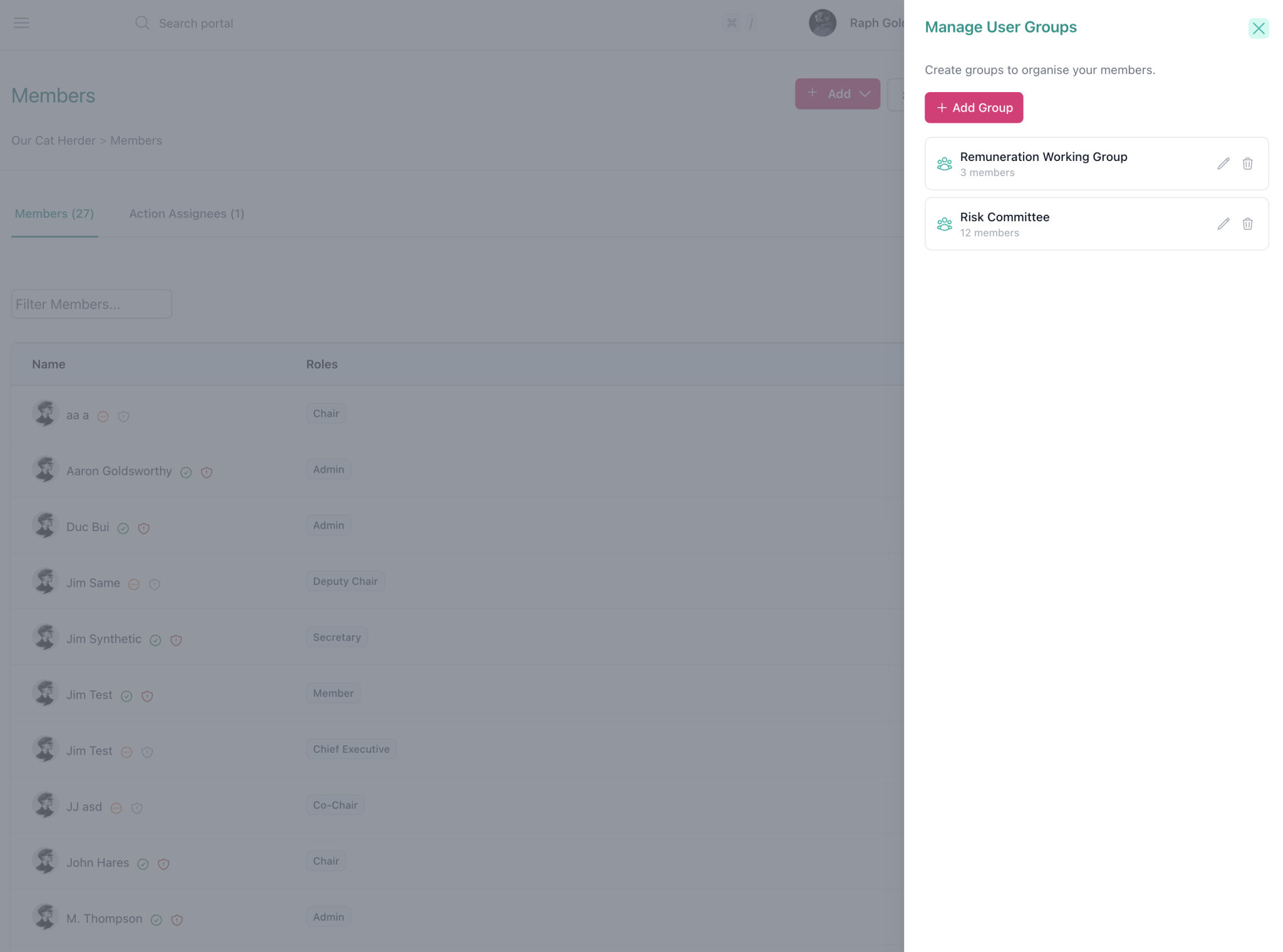
Setup is simple. Visit the Members page, create a group (Risk Committee, Strategy Task Force, Executive Team), add the people, then assign that group to meetings, registers, actions and more.
-
A member joins
Add them to the group. They sync into the meetings, discussions, folders, registers, actions and decisions that group already has. You do not go back and invite them to each item.
-
A member leaves
Remove them from the group. Discussion and folder access go immediately. Meetings and decisions they took part in stay on the record, so attendance and votes are not rewritten.
-
One director, multiple groups
A director on the board, risk and remuneration can be a member of all three groups. Guests for a single meeting don't need to be added. They can just be invited as an individual.

How committee setup works
Four steps. You can add people to a group before or after you assign the group to meetings and folders.
Set roles first
Keep to Admin, Member and Staff. Higher roles such as Chair or Secretary can see all meetings, so they are a poor fit if you need committees kept apart.
Create the groups
Open Members, then the Groups tab. Create a group for the board and one for each committee, using the committee's real name.
Assign the group
Invite the group to meetings, private discussions, document folders and registers. Expand Invite User Groups at the top of the invite modal (it is collapsed by default).
Run the year from there
Membership changes happen on the group. Filter the dashboard or list pages when you only want to see one committee's work.
One group covers the whole workflow
You already use Our Cat Herder for agendas, packs, minutes and actions. Groups use that same workflow, so a committee, working group or task force is not a second system.
- Meetings and agenda items
- Invite the group as attendees. Set a meeting role on the group (Minute Taker, Attendee or Viewer) and members inherit it. You can also assign a group to a single agenda item when only part of the meeting is theirs. See the agenda builder.
- Discussions, documents and registers
- Give the group a private discussion, a documents folder, and a register role (Manager, Contributor or Viewer). The remuneration committee sees its papers. The board sees the board's. Root-level files stay visible to everyone, so keep sensitive material in a folder.
- Actions and decisions
- Assign a group to an action or add it as voters or viewers on a decision. Group members can see those items. You still name at least one assignee on an action. Outstanding work still carries forward by meeting type.

Day-to-day committee admin
Once the groups exist, most of the work is adding or removing a person.
| Situation | What you do |
|---|---|
| New committee member | Add them to the group. They pick up existing access. |
| Member leaves the committee | Remove them from the group. Do not try to unpick them from each meeting: group access is locked so the next sync cannot add them back. |
| Guest at one meeting | Invite them as an individual. Leave them off the committee group. |
| You need one committee's view | Filter meetings, actions, decisions, discussions or the dashboard by that group. |
| Mixed audience meeting | Invite the committee group, then add extra individuals in the same modal. |
One portal or a second one?
Committees that report to the board stay in one portal. A second portal is for a separate legal entity or separate branding.
| Situation | What you use |
|---|---|
| A committee, working group or task force that reports to the board | Same portal. Create a user group. |
| A separate legal entity (subsidiary, another company, partnership, joint venture or consortium) | A second portal |
| A committee administrator needs full Admin rights but must not see board papers (Uncommon) | A second portal |
| You want separate branding (eg: partnership or joint venture) | A second portal |
Typically, clients split staff and management meetings onto another portal so board and staff data stay completely separate.
Still not sure? Contact us to discuss your requirements.
"That first meeting with Our Cat Herder saw my prep time come down to just three and a half hours."
Megan Ogier
Director of Member Services, The Association Specialists
Built for how boards actually work
Committees do the detailed work. Records need to be easy to handover.
Audit, risk, remuneration and nominations committees do the detailed work between meetings. A new committee chair needs the last year of papers, minutes, actions and registers, not a folder someone remembered to email.
- Data hosted in Australia (AWS Sydney)
- Minutes, actions and registers stay in the committee record, not in someone's inbox
- Your organisation owns its data.
Frequently asked questions about board committee management
- Can I run board committees in the same portal as the board?
- Yes. Our Cat Herder has a flat structure: there is no separate space per committee. You create a user group for each committee, working group or task force and assign that group to its meetings, discussions, folders, registers, actions and decisions. That is how most of our clients run finance, risk, remuneration, working groups and task forces alongside the board.
- Will subcommittee members see board papers?
- Not if you set roles and access correctly. Members and Staff only see meetings, folders, discussions and registers they are invited to. Keep board papers in a board folder, meeting, discussion or register assigned only to the board group.
- What is a user group in Our Cat Herder?
- A user group is a named set of members on the Members page. You assign the group anywhere you would normally invite people. Membership then stays in sync: add someone and they get the group's access; remove them and that access is withdrawn.
- Do I need another subscription for each committee?
- No. Other board portals often bill each committee as an add-on. Our Cat Herder does not. Committees, working groups and task forces that report to a board can be placed in the same portal. You need a second portal if the group is a separate legal entity (a subsidiary, another company, a partnership, joint venture or consortium) or if you want separate branding. It is uncommon, but a second portal is also the fit if a committee administrator needs full Admin rights and must not see board data. Pricing is per portal, not per user and not per group.
- Can someone sit on the board and two committees?
- Yes. A member can belong to as many groups as you need. They see the work of each group they are in, and nothing else that is locked to a group they are not in.
- What happens to the record when someone leaves a committee?
- Discussion and folder access are removed straight away. Meetings and decisions they already participated in stay in place so attendance and votes remain accurate. If you also need that historical access removed, you do it on the individual meeting or decision.
Ready to keep the board and every group in one place? Start your free 45-day trial.
Full access for the board, committees, working groups and task forces. No extra fee. No credit card required.

We're here to help
Whether you want a walkthrough of user groups, help deciding if one portal is enough, or advice on keeping the board, committees and task forces together, our team is ready to assist.